
Software Working Description
Uninstall menu registry details
Registry
In this section you can provide Registry details of the product for which you want to make Uninstallation package.
Click Registry Button on Uninstall menu, the following Uninstall-Registry Details screen will be appeared as follows:
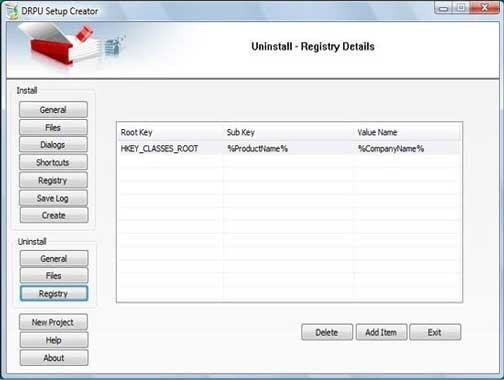
This screen contains following buttons:
-
Delete: User can delete any information by using Delete button.
- Add Item: After clicking Add Item button it will ask you to provide registry information for uninstallation package including information like-
- Root Key: Select the root key for the product whether it is HKEY_CLASSES_ROOT, HKEY_CURRENT_CONFIG, HKEY_LOCAL_MACHINE, HEKY_PERFORMANCE_DATA or HKEY_USERS.
- Sub Key: Specify the sub key of the product by using Product Variables Directory.
- Value Name: Specify the value of the product from the product variables directory.
New Project
This section helps you to create new installation package for windows application. After clicking New Project button, General Information screen will be appeared similar like Install menu General Information Screen wizard.
For detailed information, click on Install menu General Button.
Introduction

Software Installation Guide
Software Version Information
Describing the Software
Software Working Description
License and Ordering
FAQs and Troubleshooting
Getting Assistance
Quick Reference