
Software Working Description
Steps involved in creating setup for Windows application-
DRPU Setup package creator utility is an easy to use and simple software distribution and deployment utility that effectively creates a compact setup of your Windows application in easiest way.
Our popular setup builder software comprises of following sections mentioned below:
- Install
- Uninstall
- New Project
Install
Install section facilitates user with following options-
- General
- Files
- Dialogs
- Shortcuts
- Registry
- Save Log
- Create
General
This section facilitates users to provide the general information of windows application for which setup package is to be created.
Click on the General Button on Install menu, following General Information screen will be appeared:
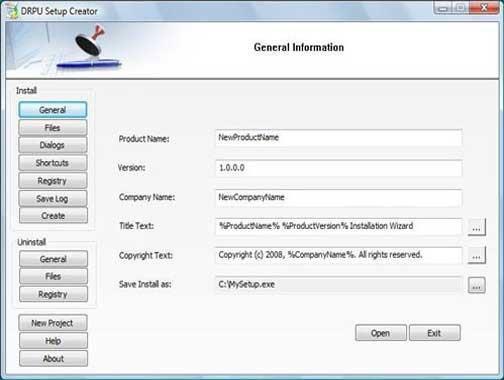
Above screen consists of the following fields:
Product Name: Lets user specify product name that will be displayed on the Setup wizard screen
Version: Specify product version for software setup
Company Name: Specify the Company name
Title Text: Specify the title for setup installation window
Note-> You can browse the list of different variables from here.
Copyright Text: Mention the copyright text to be displayed in setup dialog box
Note-> You can browse the list of different variables from here
Save Install as: Provide name for installation file and save it at chosen storage location.
The General Information window includes following buttons:
-
Open: Lets you open saved .ddl files of the installation utility. Also facilitates you to modify saved product information.
-
Exit: Exit immediately from the software window.
