
Uninstallation Instructionst
In this section, we will discuss about the Uninstallation procedure of Setup package creator utility.
Uninstallation Steps:
To uninstall Setup package creator software, use one of the following options:
Option 1:
From the Start Menu, as displayed in following screen:
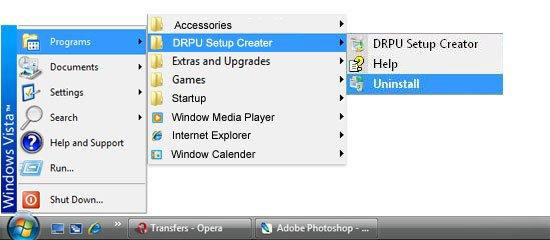
- Go to All Programs
- Select “DRPU Setup Creator Demo”
- Select “Uninstall” to uninstall the Setup package creator utility.
Option 2:
- Open Control Panel folder on your computer system.
- Double click on Add or Remove Programs icon which is located in Control Panel list.
- On clicking Add or Remove Programs, following screen containing a list of software installed on your system will be displayed:
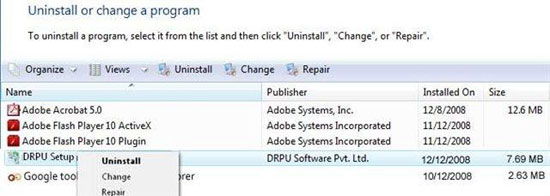
- Select Setup package creator utility and click on “Remove” button.
- After clicking “Remove” button, the Uninstallation Wizard screen will be appeared which will guide you to uninstall the software.
- Click on “Uninstall” button to continue the Uninstallation process.
- On clicking “Uninstall” button, screen will display the Uninstallation of application files.
- Click on “Finish” button to finish the Uninstallation process.
- After clicking “Finish” button, the Uninstallation Complete screen will be appeared:
- Click on “Finish” button to complete the Uninstallation process.
Now Setup package creator utility program has been completely uninstalled from your computer system.
Introduction

Software Installation Guide
Software Version Information
Describing the Software
Software Working Description
License and Ordering
FAQs and Troubleshooting
Getting Assistance
Quick Reference