
Working with Software Modules
Currency Management
Currency is the form of money which is used to exchange or transfer the goods or services.
To create currency for business transactions, click on “Masters > Currency”, the following options will be displayed:
To Create Currency for business transactions, click on “Masters > Currency > Currency Creation”, the following screen will be appeared:
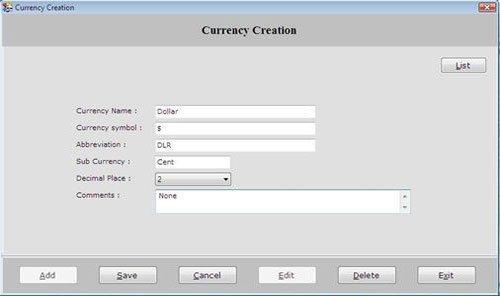
This screen contains the following fields:
-
Currency Name: Enter the currency name which is to be created.
-
Currency Symbol: Enter the symbol for the currency. For Example: € is the symbol Euro.
-
Abbreviation: Enter the abbreviation of currency.
-
Sub Currency: Enter the sub-currency of the currency. For Example: Cent is the sub-currency of Euro (€).
-
Decimal Places: Select the decimal place of the currency as 0,1,2,3.
-
Comments: Enter the special note about the currency.
After entering all the details, click on “Save” button to save the information.
This screen contains the following buttons:
-
Add: To add new currency.
-
Save: To save the record.
-
Cancel: To cancel particular operation.
-
Edit: To edit existing records.
-
Delete: To delete the record.
-
Exit: To exit from current window.
-
List: To display a list of all existing records.
To view currency details, select that currency from the list and press Enter or Double click.
