
Working with Software Modules
Unit Creation
A unit is a parameter to measure the items. Unit can be any division of quantity accepted as standard unit of measurement or exchange.
For Example: Oil measures in Liter, Rice measures in Kilogram and so on.
To create unit for the item,, click on “Masters > Unit Creation”, the following screen will be appeared:
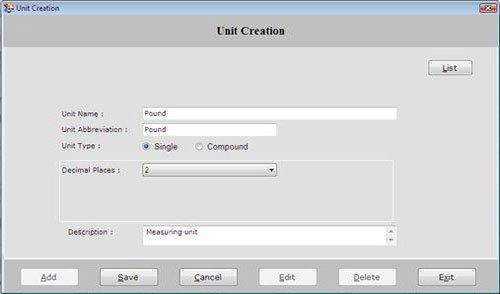
This screen contains the following fields:
-
Unit Name: Enter the unit name which is to be created.
-
Unit Abbreviation: Enter the abbreviation of the unit.
-
Unit Type: Select the unit type whether it is Single or Compound.
Compound field becomes active when you select the unit type as a Compound.
A compound Unit is a relation between two single units. To create a compound unit, you must need to previously create two single units.
After selecting Unit Type as a Compound, the following fields will be displayed:
-
Super Unit: Select the super unit of sub unit which is to be created.
-
Per Unit: Enter the quantity of per unit.
1 Super Unit= Per Unit * Unit Name
Description: Enter the special note about the unit.
After entering all the details, click on “Save” button to save the information.
This screen contains the following buttons:
-
Add: To add new units.
-
Save: To save the records.
-
Cancel: To cancel particular operation.
-
Edit: To edit existing records.
-
Delete: To delete the record.
-
Exit: To exit from current window.
-
List: To display a list of all existing records
To view unit details, select that unit from the list and press enter or double click.
