
Uninstallation Instructions
Server Module Uninstallation
You can uninstall USB Activity Monitoring-Server setup by any of the following methods:
Method-1
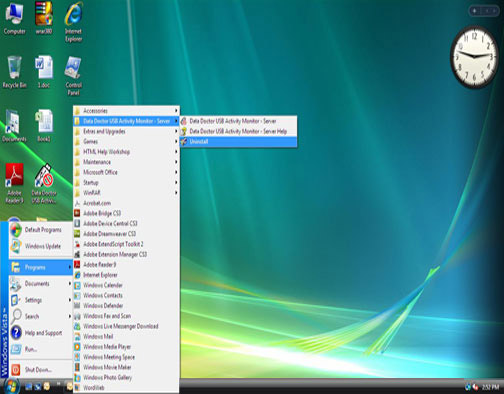
- In Microsoft OS Window, click the Start button.
- Go to Programs option and click USB Activity Monitor-Server Module.
- Click the uninstall option.
The above described procedures are shown in the window below:
Method-2
- In Microsoft OS Window, click the Start button.
- Open Control Panel folder on your computer system.
- Double click on Add or Remove Programs icon which is located in Control Panel list.
- On clicking Add or Remove Programs, a list of software installed on your system will be displayed. Select USB Activity Monitor-Server Module and click on “Uninstall/Remove” button.
Introduction

Software Installation Guide
Software Version Information
Describing the Software
Software Interface Description
Working with Software Modules
License and Ordering
FAQs and Troubleshooting
Getting Assistance
Quick Reference