
Sale Transfer Form
Sale Transfer Form refers to the Sales Tax declaration form which is used by registered dealers for sale transfer. Sales Tax department issues ST forms only to those dealers who are registered with the Sales Tax department. The issuer (registered dealer) of this form does not pay the tax directly but takes on the responsibility of collecting tax on further sale of goods.
For Example: if an inter-state sale is made to a registered dealer then ST Form, C, is required.
To create ST Form, Click on “Masters > Sale Transfer Form”, the following screen will be appeared:
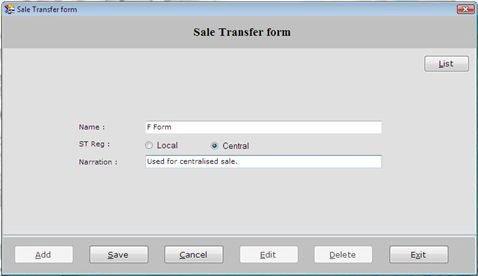
This Screen contains the following fields:
-
Name: Enter the name of Sale Transfer Form which is to be created.
-
ST Region: Select the sale transfer region whether it is for Local or Central.
-
Local Region-> Select Local region if the ST form is used for within state transactions.
-
Central Region-> Select Central region if the ST form is used for inter-state transactions.
-
- Narration: Enter the special note about Sale Transfer Form.
After entering all the details, click on “Save” button to save the information.
This screen also contains the following buttons:
- Add: To add new Sale Transfer Form.
- Save: To save the record.
- Cancel: To cancel particular operation.
- Edit: To edit existing records.
- Delete: To delete the record.
- Exit: To exit from current window.
- List: To display a list of all existing records.
To view the detail of Sale Transfer Form, select the particular record from the list and press Enter or Double click. The selected Sale Transfer Form information will be displayed.
