
Working with Software Modules
Balance Sheet is a financial report that shows financial position of the Company on a particular time, often the last day of the year. The balance sheet shows company assets (resources owned), and liabilities (debts owed) at specific time period.
It is prepared from the Trial Balance accounts. The balances of the accounts are grouped as assets and liabilities which are arranged in a proper manner in the Balance Sheet. Further, the net profit or loss calculated in the Profit & Loss account is posted in the Balance Sheet.
To view Balance Sheet Report, click on “Reports > Final Report > Balance Sheet Report”, a screen will be appeared in which you can select the month as on you want to view Balance Sheet Report.
By default, month will be displayed from when the financial year of company has been started.
For Example: If you want to view Balance Sheet Report as on September 2008 then select the month as September. In such a case, the Balance Sheet report will be generated.
After selecting the month, click on “Show” button, the following screen will be appeared:
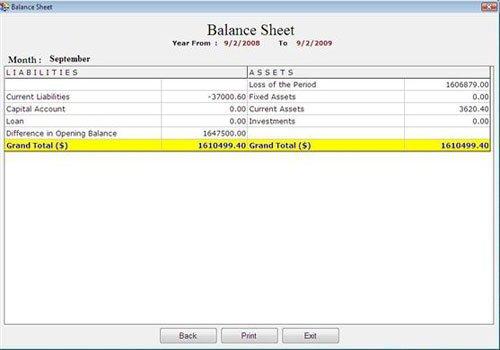
Balance Sheet Report consist the following fields:
-
Liabilities: This column displays all those Primary Account Groups which have accounts with credit balance. It also displays net profit earned by the company as calculated in Profit & Loss Account. The Primary Account Groups display in this column are:
- Current Liabilities
- Capital Account
- Loan
- Difference in Opening Balance (credit balance)
- Other user-defined Primary Groups with credit balance
- Profit for the period
-
Assets: This column displays all those Primary Account Groups which have accounts with debit balance. It also displays net loss of the company as calculated in Profit & Loss Account. The Primary Account Groups display in this column are:
- Fixed Assets
- Current Assets
- Investments
- Difference in Opening Balance (debit balance)
- Other user-defined Primary Groups with debit balance
- Loss for the period
- Grand Total: This field displays the total amount of liabilities and assets.
Note-> Assets and Liabilities must be equal.
Balance Sheet Report consist the following buttons:
-
Back: To go back on previous window.
-
Print: To take print.
-
Exit: To exit from current window.
To View/Edit Balance Sheet Report details, apply the following process:
-
Select the field from Assets or Liabilities and press Enter or Double Click to view balance sheet detail by Group Wise and then Account Wise.
-
If you select Profit for Period from Liabilities or Loss for Period from Assets then Profit and Loss Report will be displayed.
-
If you select Difference in Opening Balance then Account Wise Balance Sheet will be displayed.
